Infertility is a growing global issue where one in six couples will battle with getting pregnant but affordable high-quality infertility services in their local geographical area remains a pipe dream for many couples and individuals seeking to start a family.
In response to this, fertility or reproductive holidays have become a growing and booming industry. Classified as a category of medical tourism, fertility holidays involves an individual or couple traveling abroad to undergo assisted reproductive procedures with the goal of getting pregnant while taking in some tourist sites during their stay. The result? Hopefully, a souvenir of a different kind – the kind that helps individuals and couples start the family they’ve always dreamed of.
When people embark on fertility holidays, two main assisted reproductive technologies (ART) that are sought out include IVF and egg donation.
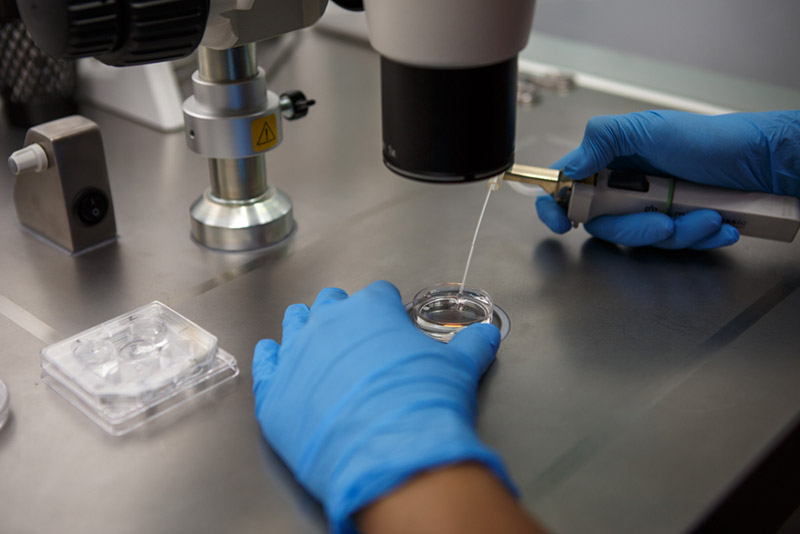
IVF, medically known as in-vitro fertilization is the process of extracting eggs and sperm from the intended couple and then fertilizing the egg in laboratory dish before the fertilized egg is then transferred into the woman’s uterus. The process of IVF can be explained in five general steps:
Step 1 – fertility medications is prescribed to the intended female to stimulate egg production. Multiple samples of eggs are preferred as some eggs will not develop or fertilize after they have been extracted. The patient will undergo a transvaginal ultrasound so that they’re ovaries may be examined and then a blood test is done to check and monitor hormone levels.
Step 2 – Eggs are extracted through the pelvic cavity using a hollow needle and ultrasound images, which help guide the doctor to remove the eggs. The patient will be administrated some medication to minimize discomfort during this procedure.
Step 3 – The male partner is then asked to provide a sperm sample so that it can be used to fertilize the extracted eggs.
Step 4 – the retrieved sperm and egg are taken to a laboratory where they are combined together in a process called insemination. The combined sperm and egg are stored in a laboratory dish to encourage fertilization.
Step 5 – After three to five days of the insemination process, the fertilized egg is transferred back into the woman’s uterus using a catheter or small tube. While the procedure is considered painless, some women may experience cramping or slight discomfort. If the IVF procedure is successful, implementation can occur between six to ten days after the egg retrieval.
As with many medical procedures, there is a possibility of side effects that a patient may experience. In the case of IVF, some women may experience mild cramping or bloating, discharge of clear or blood-tinged fluid, constipation and breast tenderness. However, these symptoms should pass after a few days and should not impede upon the patient’s daily schedule.
Individuals or couples who seek IVF do so due to one or more of the following infertility issues:
- Blocked, damaged or removed fallopian tubes
- Decreased sperm count or sperm motility
- Ovulation disorders or uterine fibroids
- Genetic disorders
Egg donation on the other hand, while similar to the procedure of IVF, involves using a donor egg instead plus the recipient partner’s sperm to create an embryo. Individuals who donate their eggs have to undergo several tests, medical examinations and genetic testing to ensure that they are viable candidates. Egg donors usually donate their eggs for altruistic, non-monetary reasons and may be either anonymous, depending on the specific laws of the country, or family and friends. Patients who opt for egg donation do so because previous assisted reproductive techniques like IVF may have failed; or they suffer from premature ovarian failure; or simply because their age has resulted in a natural reduction of fertility.

When it comes to prime destinations for fertility holidays, the Czech Republic ranks high on many fertility tourists’ list due to its attractive geographical location in Europe, affordable costs and high-quality before and aftercare. The Czech Republic also has a long history associated with reproductive assistance, which dates back to 1982 when the first child was created though assisted reproduction – only four years after assisted reproductive technologies were introduced to the world. Thanks to this long history, the Czech Republic has earned a reputation for having some of the highest quality infertility treatment centers and clinics in the world, with many comprehensive IVF clinics being able to help up to 90% of couples and having success rates with egg donations of up to 70%.
Another reason why the Czech Republic is a hotspot for fertility tourists is due to their flexible legislations when it comes to the donation of egg and sperm. The country permits anonymous donation, which is legal, voluntary and safe. The donations are altruistic in nature though donors are compensated for any donation-related inconvenience that can be proven to have occurred. Another draw for fertility tourists is that Czech legislation allows for the individual or couple to choose the physical characteristics of the donated sperm or egg, thus allowing them to create their “perfect” family.
A third reason why the Czech Republic is popular among fertility tourists is cost – compared to other European countries such as Spain and Greece, the Czech Republic remains one of the cheaper destinations for fertility treatments with no compromise on the quality of care and equipment. While Prague and Brno remain the most popular Czech cities for fertility tourists, one can also find equally high-quality treatment and services in smaller cities such as Zlin, Olomouc and Hradec Kralove for an even lower price.
For example, IVF treatments in Prague average at around €2,500 while in Brno it’s around €2,200. If a patient decides to seek treatment in smaller cities the average cost for IVF can be as low as €1,950. If the individual or couple decides to combine IVF with egg donation, prices start at around €5,000 in Prague, €4,300 in Brno and €4,600 in smaller cities.
The affordable cost of these fertility treatments is what makes the Czech Republic a prime destination for fertility tourists from all over the world, especially those from the United States where a single round of IVF can cost up to $15,000.
In conclusion, fertility holidays continue to be a financial incubator for the medical tourism industry as individuals or couples turn to clinics and hospitals abroad to help solve their infertility issues. The combination of safer and more affordable overseas travel and high-quality fertility treatments at lower costs abroad are just some of the draws that continue and will probably continue to attract fertility tourists from all corners of the globe.